

PowerSchool Parent Portal
SHARE


Sign up for the PowerSchool Parent Portal and stay connected to your students school life!
The Parent Portal allows you to:
- View real-time attendance
- View current grades
- Check missing assignments
If you need your student's Access ID and Password, please contact the Main Office at 204-729-3180, or neelin@bsd.ca
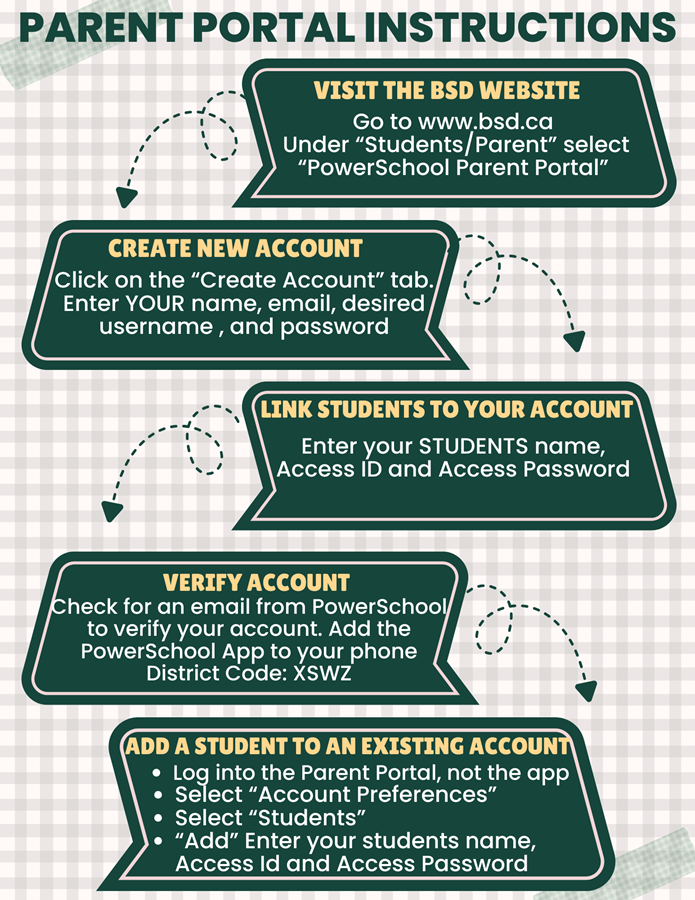
Create an Account
- Go to the PowerSchool Parent Portal website https://brandon.powerschool.com/public/
- Click on "Create Account"
- Enter YOUR name, email, username, and password
- Enter your STUDENT'S name, Access ID, and Access Password
- Check your email for a verification email and click the verification link
- Download the PowerSchool app on your phone if you choose. This will require the district code: XSWZ
Add a student to your existing account
- Log into your Parent Portal account, not on the app
- Select "Account Preferences"
- Select "Students" tab and choose "Add"
- Enter your student's name, Access ID and Access Password
 Google Translate